
Facebook Ads Manager: The Complete Guide to Meta Advertising (2026)
If you’ve ever opened Meta Ads Manager and felt instantly overwhelmed — you’re not alone. Between campaign objectives, ad sets, audience targeting, and a dashboard that seems to change every few months, it can feel like a lot to take in. But once you understand how the pieces fit together, it actually makes a lot of sense.
This guide breaks down everything you need to know about Facebook Ads Manager and Meta advertising — from what it is and how it works, to campaign structure, ad formats, targeting, and what’s changed in 2026.
The Three-Level Campaign Structure
Before you run a single ad, it helps to understand how Meta organises everything. Meta ads follow a three-level hierarchy: Campaigns → Ad Sets → Ads.
1. Campaign Level — Your Objective
This is the top of the structure, and it’s where you tell Meta what you’re trying to achieve. Every campaign is built around a single objective, and your choice here directly influences how the algorithm delivers your ads.
In 2026, Meta has streamlined campaign objectives into six core goals:
- Awareness — reach people who are likely to remember your brand
- Traffic — send people to your website, app, or Facebook event
- Engagement — get more interactions, followers, video views, or messages
- Leads — collect contact details via instant forms, calls, or Messenger
- App Promotion — drive installs or in-app activity
- Sales — find people most likely to purchase, sign up, or convert
For most advertisers, Sales and Leads tend to deliver the strongest ROI because they give Meta’s algorithm clear conversion signals to optimise around. Awareness campaigns are better suited for brand-building at the top of the funnel.
Pick one objective per campaign. This isn’t just a formality — it shapes how Meta’s machine learning works behind the scenes to find the right people for your ads.
2. Ad Set Level — Audience, Budget & Placement
The ad set is where the real targeting decisions happen. This is where you define:
- Who sees your ad — age, location, gender, interests, behaviours, and custom audiences
- Where your ad appears — Facebook Feed, Instagram Reels, Stories, Messenger, Audience Network, and more
- How much you spend — daily or lifetime budget, and the schedule for delivery
- How Meta bids — the strategy used to compete in the ad auction
One campaign can contain multiple ad sets. For example, you might have one ad set targeting first-time visitors to your website and another targeting people who’ve already engaged with your content — each with different messaging and budgets.
A significant change that took effect in January 2026: Meta deprecated detailed interest-based targeting, pushing advertisers toward broader audience settings and its AI-driven Advantage+ Audience feature. This doesn’t mean targeting is dead — it just means Meta’s algorithm now plays a bigger role in finding the right people within your defined parameters.
3. Ad Level — Your Creative
This is what people actually see. Each ad set can contain multiple ads — different images, videos, headlines, body copy, and calls to action — which makes it easy to test variations and identify what resonates best with your audience.
You can run single image ads, video ads, carousel ads (multiple images or videos in a swipeable format), collection ads, Stories ads, Reels ads, and more. We cover the different ad formats in detail further below.
How to Set Up a Campaign in Meta Ads Manager
Step 1: Go to Meta Ads Manager
Navigate to business.facebook.com and open Ads Manager. Click the green Create button to start a new campaign.
Step 2: Choose your campaign objective
Select the objective that best matches your goal — Awareness, Traffic, Engagement, Leads, App Promotion, or Sales.
Step 3: Name your campaign
Keep your naming convention consistent and descriptive. Something like “Summer Sale – Sales – May 2026” makes it easy to identify campaigns later when you’re managing multiple at once.
Step 4: Set your ad set details
Define your target audience, choose your placements (you can use Meta’s Advantage+ Placements to let the algorithm decide, or manually select specific surfaces), set your daily or lifetime budget, and pick your start and end dates.
Step 5: Create your ad
Choose your ad format, upload your creative (image or video), write your headline and primary text, add a destination URL, and select a call-to-action button. You can preview how your ad will appear across different placements before publishing.
Step 6: Publish and monitor
Once your campaign goes live, Meta Ads Manager gives you real-time data on impressions, clicks, cost per result, and more. Use this data to optimise — pause underperforming ads, scale what’s working, and refine your audience targeting over time.
Meta offers a wide range of ad formats, each suited to different goals and creative approaches. Here’s an overview of the main ones:

Image Ads
The most straightforward format — a single static image with accompanying text and a CTA. Good for promotions, announcements, or product showcases where one strong visual does the talking.

Video Ads
Video remains one of the most effective formats on Meta's platforms, particularly for brand storytelling, product demonstrations, and building awareness. Short-form video (under 15 seconds) tends to perform well in Reels and Stories placements.

Carousel Ads
Carousel ads let you show between 2 and 10 images or videos in a single swipeable unit, each with its own headline, description, and link. They're popular for showcasing multiple products, walking through a step-by-step process, or telling a visual story.
Collection Ads
Collection ads pair a main image or video with a grid of product images below it. When someone taps the ad, it opens into a full-screen experience — known as an Instant Experience — without ever leaving the app. Ideal for e-commerce brands.
Lead Ads
Facebook lead ads let users submit their contact information directly within the Facebook or Instagram app — no separate landing page required. The form pre-fills with the user's profile information, which makes it quick and easy to complete. Lead ads are particularly effective for generating enquiries, newsletter sign-ups, and consultation requests.

Stories and Reels Ads
Full-screen vertical ads that appear within Stories or Reels on both Facebook and Instagram. These are immersive and work best with short, attention-grabbing video content.

Messenger Ads
Ads that appear in the Messenger inbox or that open a Messenger conversation when clicked. Useful for businesses that want to drive direct, conversational engagement with potential customers.
Audience Targeting in Meta Ads Manager
One of the things that makes Meta advertising so powerful is the depth of its audience targeting. When you create an ad set, you have several ways to define who sees your ads.

Core Audiences
These are built from the data Meta collects across its platforms. You can target based on:
- Demographics — age, gender, location, education, job title
- Interests — pages liked, topics engaged with, hobbies
- Behaviours — purchase history, device usage, travel habits
Note that interest-based detailed targeting has been significantly reduced following Meta’s January 2026 deprecation of this feature. Broader targeting approaches, combined with Meta’s AI, now tend to outperform highly granular audience definitions.

Custom Audiences
Custom audiences let you target people who already have some relationship with your business. You can create them from:
- Your website visitors (via the Meta Pixel or Conversions API)
- Customer lists — upload a CSV of email addresses or phone numbers
- App activity
- People who’ve engaged with your Facebook page or Instagram profile

Lookalike Audiences
Once you have a custom audience, you can ask Meta to find other users who share similar characteristics — these are lookalike audiences. They’re a powerful way to find new potential customers who behave like your existing ones.

Advantage+ Audience
Meta’s newer AI-driven audience feature. Instead of manually defining every targeting parameter, Advantage+ Audience uses machine learning to find the best-performing audience for your campaign, using your custom audience inputs as a starting signal. Many advertisers are finding this approach competitive with — and sometimes better than — manually built audiences.
Campaign Budget Stratergy: CBO vs ABO
When it comes to budgeting, Meta gives you two approaches:
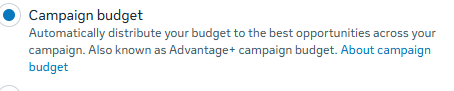
Campaign Budget Optimisation (CBO)
You set one budget at the campaign level, and Meta’s algorithm automatically distributes spend across ad sets based on which ones are performing best. It’s generally recommended for most campaigns, as it allows the algorithm more flexibility.
Ad Set Budget Optimisation (ABO)
You set individual budgets for each ad set. This gives you more control but requires more manual management, since you’re deciding how much each audience receives rather than letting the algorithm decide.

For most advertisers in 2026, CBO is the default recommended approach.
What's New in Meta Advertising in 2026
Meta’s platform is constantly evolving, and keeping up with the changes helps you stay ahead. Here are the most significant developments:
Advantage+ is now the default mode.
When you combine broad targeting, optimised placements, campaign-level budgets, and a conversion event, Meta automatically activates Advantage+ and shows a green “Advantage+ On” label in Ads Manager. This signals that the algorithm is running in full automation mode.
Advantage+ Sales Campaigns have expanded.
Originally focused on e-commerce purchases, Meta renamed its Advantage+ Shopping Campaigns to Advantage+ Sales Campaigns in early 2025 and expanded them to support lead generation and app installs as well. The legacy campaign APIs were fully deprecated in Q1 2026.
Detailed targeting has been deprecated.
Interest-based audience segments created before October 2025 no longer deliver ads as of January 2026. Advertisers now need to rely on broader targeting inputs or Advantage+ Audience to let the algorithm find the right people.
AI-generated creative tools.
Meta has introduced generative AI tools inside Ads Manager that can suggest copy variations, generate image backgrounds, and create alternative headline options. These are useful for testing, though most advertisers still find that human-crafted creative outperforms purely AI-generated ads.
Key Metrics to Track in Meta Ads Manager
Short-form vertical video across Facebook and Instagram Reels has become one of the most competitive — and high-performing — placements on the platform. If you're not testing Reels, you're likely leaving reach on the table.
Key Metrics to Track in Meta Ads Manager
Understanding what your numbers mean is just as important as knowing how to set up a campaign. Here are the core metrics to pay attention to:
Impressions
How many times your ad was shown
Reach
How many unique people saw your ad
Click-through rate (CTR)
Percentage of people who clicked after seeing your ad; a CTR above 1.5% early on is generally a good indicator
Cost per click (CPC)
How much you’re paying on average per click
Cost per lead (CPL)
For lead generation campaigns, the average cost to acquire each lead
Cost per purchase / Cost per result
The most important metric for conversion campaigns
Return on ad spend (ROAS)
Revenue generated for every rupee spent on ads
Frequency
How many times the same person has seen your ad on average; a high frequency with declining performance usually signals ad fatigue
Don’t track everything at once. Focus on the metrics that align with your campaign objective — if you’re running a leads campaign, cost per lead matters more than CTR.
The Learning Phase Explained
When you launch a new ad set, it enters what Meta calls the learning phase. During this period, the algorithm is actively testing different audience segments and delivery strategies to figure out who to show your ads to and when.
The learning phase typically ends after your ad set achieves around 50 optimisation events (clicks, leads, purchases — depending on your objective) within a 7-day window. During this phase, performance can be inconsistent, and costs may be higher than usual. This is normal.
To help your campaigns exit the learning phase efficiently:
- Avoid making significant changes to your ad set while it’s learning (budget, targeting, creative)
- Set a realistic budget that can support at least 50 events per week
- Consolidate ad sets where possible rather than splitting budgets too thinly
Facebook Ads vs Boosting a Post: What's the Difference?
This is one of the most common questions from people new to Meta advertising. Boosting a post is essentially a simplified version of running an ad — you click “Boost Post” from your Facebook page, set a budget, choose a broad audience, and the post gets promoted.
Meta Ads Manager, on the other hand, gives you access to the full suite of ad objectives, all placement options, detailed audience targeting (including custom and lookalike audiences), advanced bidding strategies, the Pixel, Conversions API, and in-depth reporting.
Boosting is fine for quickly adding reach to a popular organic post. But if you want to run structured campaigns with clear goals and measurable ROI, Meta Ads Manager is where you need to be.
Quick Reference: Meta Ads Manager Glossary
Ad Account — The container that holds all your campaigns, billing information, and settings.
Meta Business Suite — The central hub for managing your Facebook page, Instagram profile, and advertising assets.
Meta Pixel — A snippet of code installed on your website that tracks visitor behaviour and reports back to Meta for conversion optimisation and audience building.
Conversions API — A server-side tracking solution that works alongside the Pixel to improve data accuracy, particularly in a cookie-restricted environment.
Ad Set — The second level of the campaign hierarchy, where you set audience, budget, placement, and schedule.
Instant Experience — A full-screen, mobile-optimised landing page that loads within the Facebook or Instagram app when a user taps a Collection or Canvas ad.
Lookalike Audience — An audience Meta builds by finding users similar to your existing customers or website visitors.
Learning Phase — The period during which Meta’s algorithm optimises delivery for a new or significantly edited ad set.
ROAS — Return on Ad Spend. Revenue generated divided by the amount spent on ads.
Advantage+ — Meta’s suite of AI-powered campaign automation tools covering audiences, placements, creative optimisation, and campaign types.
Final Thoughts
Meta Ads Manager is one of the most powerful advertising platforms available to businesses of any size. Whether you’re running a brand awareness campaign or a direct-response lead generation campaign, understanding the structure — campaign, ad set, ad — and the logic behind each setting puts you in a much stronger position than guessing your way through the interface.
The platform has shifted significantly toward AI-driven automation in 2026, which means that setting up the right foundation — clear objective, strong creative, proper tracking — matters more than ever. Give the algorithm what it needs to learn, and it will generally work in your favour.
If you want to go deeper on any part of this, we have dedicated guides covering Facebook ad formats, audience targeting, Facebook ads cost in India, and how to use the Meta Ads Manager app on mobile.